Originally posted by claydoh
View Post
-
Thanks claydoh - already done, as above. osholuvr has given a listing of his (presumably working!) bluetooth stuff - do you know the cli command for that? -
All I did to add bluedevil to my autostart is to go to the Autostart section in System Settings and click "Add Program". then browse the menu tree in the dialog to find Bluedevil --in the Internet category, of all places. You can also just type in "blue" in the search box and select "bluedevil-monolithic".Leave a comment:
-
oshunluvr: I've put bluedevil in autostart too. What command gets that bluetooth listing? that might tell me what I'm missing when compared against yours.Leave a comment:
-
I do not have a bluetooth entry in system settings. However, I use bluetooth by starting it manually using a .desktop file in ~/.config/autostart . Here's the contents:
Seems likely that you're missing something from the install. Here's a list of my installed bluetooth packages:Code:[Desktop Entry]Categories=Qt;KDE;X-Bluetooth;Network; Comment[en_US]=KDE Bluetooth support Comment=KDE Bluetooth support Exec=bluedevil-monolithic GenericName[en_US]=BlueDevil GenericName=BlueDevil Icon=preferences-system-bluetooth MimeType= Name[en_US]=BlueDevil Name=BlueDevil NoDisplay=false Path= StartupNotify=true Terminal=false TerminalOptions= Type=Application Version=1.0 X-DBUS-ServiceName= X-DBUS-StartupType= X-KDE-SubstituteUID=false X-KDE-Username=
Code:ii bluedevil 2.0~rc1really1.3.2-0ubuntu1 amd64 KDE Bluetooth stack ii bluemon 1.4-6ubuntu1 amd64 Activate or deactivate programs based on Bluetooth link quality ii bluetooth 4.101-0ubuntu25 all Bluetooth support ii bluewho 0.1-1 all notifies new discovered bluetooth devices ii bluez 4.101-0ubuntu25 amd64 Bluetooth tools and daemons ii bluez-alsa:amd64 4.101-0ubuntu25 amd64 Bluetooth ALSA support ii bluez-audio 4.101-0ubuntu25 all Transitional package ii bluez-compat 4.101-0ubuntu25 amd64 BlueZ 3.x compatibility binaries ii bluez-cups 4.101-0ubuntu25 amd64 Bluetooth printer driver for CUPS ii bluez-gstreamer 4.101-0ubuntu25 amd64 Bluetooth GStreamer support ii bluez-tools 0.1.38+git662e-3 amd64 Set of tools to manage Bluetooth devices for linux ii bluez-utils 4.101-0ubuntu25 all Transitional package ii libbluedevil1:amd64 2.0~rc1really1.9.4-0ubuntu1 amd64 Qt wrapper for bluez ii libbluetooth3:amd64 4.101-0ubuntu25 amd64 Library to use the BlueZ Linux Bluetooth stack ii libqt5bluetooth5:amd64 5.4.1-1ubuntu1 amd64 Qt Connectivity Bluetooth module ii libqt5bluetooth5-bin:amd64 5.4.1-1ubuntu1 amd64 Qt Connectivity Bluetooth module helper binaries ii pulseaudio-module-bluetooth 1:6.0-0ubuntu6 amd64 Bluetooth module for PulseAudio sound server ii python-bluez 0.20-1 amd64 Python wrappers around BlueZ for rapid bluetooth development
Last edited by oshunluvr; Jul 29, 2015, 07:02 AM.Leave a comment:
-
strange i do have a bluetooth entry in my system settings. it is possible that the version of plasma 5 included by default with 15.04 does not have it as part of its bluetooth issues. have either of you upgraded kde with the backports repo ? 15.04 has the newest KDE software and right now its all switching to KF5 so somethings currently just are not done or don't work . you may wish to use 14.04 since you can install plasma 4 and its much more stable.Leave a comment:
-
Right. It all looks OK so far. Found Multimedia under Hardware. Still no Bluetooth that I can see. Multimedia has Audio and Video, which shows as Phonon and I found the Streamer under the Backend tab. A bit of fiddling had it show as a preference/option in Audio Playback, but still Kmix only shows it for Event Sounds (And I haven't heard a peep yet).I can *sometimes* get the test sound from the usual devices as listed in Kmix, but not a peep through the Streamer.
8:30pm here in NZ, so I'll give it a bye for the day. Thanks for the help so far.Leave a comment:
-
Too right it's not normal. There's probably a fix in a script somewhere. Appearance, Workspace (added bluedevil as above already), Personalisation, Network and Hardware are there, that's all. Any others missing?Leave a comment:
-
If you want to configure Bluetooth, do that From the tray icon, which you start by running bluedevil from the kmenu.
You'll want to go into system settings and add bluedevil as an autostart item in the Startup and Shutdown section.
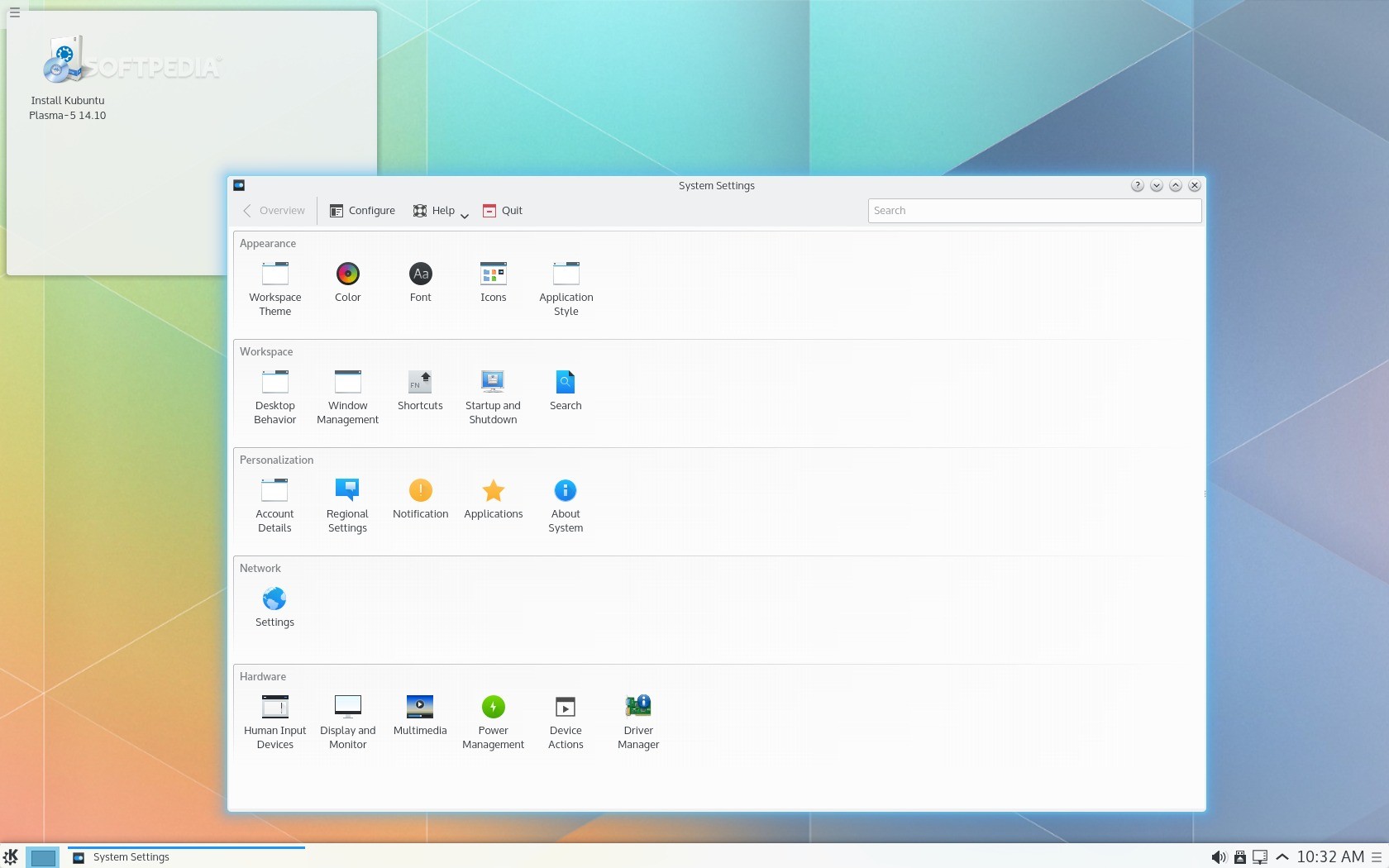
Not having Multimedia in System Settings, that's not normal. It should be there, at the bottom somewhere.
Sent from my LG G4Leave a comment:
-
Yikes! What sort of cesspit am I wading in? System Settings has NO Bluetooth, or Multimedia! claydoh and vinniewright have guided me so far - thanks! , but I still have no bluedevil on startup, and when run manually the device is paired. PLEEZ - am I the only one with such woes?Leave a comment:
-
some things to check
do you have "enable kde bluetooth intergration" checked in system settings -> bluetooth?
Are you able to connect the device via bluetooth using System Settings -> bluetooth?
Please also check that you have your device in pairing mode when your attempt to pair.
iirc their is a bug in plasma5 (at least the version that shipped w/ 15.04) where the bt icon doesn't always show in the tray..
Since you have 15.04 and therefore you have plasma5 and cannot use veromix (that i know of).You need to now Tell KDE what audio device to output to so that you get sound. Make sure you use System Settings -> Multimedia -> Device Preferances to set you preferred device to your connected bluetooth set.Leave a comment:
-
Yep - nothing shows on startup - Icon in SysTray after Kickoff as above. Streamer detected. Connect Headset or Audio Sink? Neither connected at present, both time out (device is switched on ). Still no device in Kmix, though Event Sounds will Move between Built-in and Caicos (presumably raw device?). I feel like a total newbie idiot here... lead me on!
Leave a comment:
-
do you even see the bluetooth icon in the system tray ?
if not maby it is not starting with the system ,,,,go to Kickoff>applacations>internet> and click on "BlueDevil" ,,,,,,,,dose anything happen ,,,,,do you get a bluetooth icon in the system tray?
VINNYLeave a comment:
-
Thanks Vinny. Do the distro compilers really think Kubi-users are dolts? Why the brain-dead Discover at all, let alone as default? I didn't even know the muon Package Manager existed - it might have been an option... - would have saved a lot of head-scratching to go through from command-line apt-get to aptitude to synaptic.
As usual, we eventually get there - linux *works*, and is getting towards the 'rocks' point
Leave a comment:
-
First, blueman-applet will not remove or purge, but Synaptic says it's just blueman. Re-start after complete removal?Originally posted by claydoh View Post
Next, Synaptic reports bluedevil as already installed, and latest. Kmix shows no option to Move on right-click, and only the built-in analog device.
Then, nothing showing in System Settings for Bluetooth in any form.
Where to now?
Hopefully...Last edited by Fester Bestertester; Jul 28, 2015, 03:18 PM.Leave a comment:
Leave a comment: