Announcement

Collapse
No announcement yet.

Bluetooth woes

Collapse
This topic is closed.
X
X
 
  • Filter
  • Time
  • Show
Clear All
new posts

  • vinnywright
    replied
    cool ,,,,,,yes @sithlord48 ,,,this looks like it may do what he wants ,,,,,,,,,I have not tested it yet and do not know yet if it is the *buntu repo ,,,,,,but it was hear in Debian-8


    will boot to Kubuntu-15.04 in a few and see

    VINNY

    Leave a comment:


  • sithlord48
    replied
    well you can try this suggestion from an old askubuntu

    http://askubuntu.com/questions/78174...utputs-devices

    Leave a comment:


  • Fester Bestertester
    replied
    Yes! Someone finally twigged! I'm DEAF, and I presently use an amp-and-cans (with bass cut, treble boost) here at the computer, and also at the TV. The TV has an aux out independent of the remote's controls (audio from the set's speakers can be set to family's comfort or muted and I still get sound from the amp-and-cans), but in either case I spend my days with cans over my ears, which isolates me from family (wife and grandson). The TV has no bluetooth, so I'm stuck there, but here at the screen I just might have a little more social interaction from just muting or 'backgrounding' the Streamer or the content being sent that way, and if family want in on what I'm doing they can listen in via the amp (no cans needed there ). There is a TV add-on for the Streamer, but it's expensive. As long-term beneficiary I can't afford that. Guess I'll have to wait for a 'smarter' TV with either bluetooth or an audio-stream feed down the network...

    Leave a comment:


  • sithlord48
    replied
    are you trying to have the sound come out the hdmi and your bluetooth device at the same time? if that is a case im not sure how to do that.

    Leave a comment:


  • Fester Bestertester
    replied
    OK - just another way to do the 'select-one-to-the-exclusion-of any-other' non-Mixer stuff. Read above re right-click on SysTray Speaker icon. And then re the Mixer not-obvious-it's-a-button below those sliders.
    Last edited by Fester Bestertester; Aug 04, 2015, 10:47 PM.

    Leave a comment:


  • sithlord48
    replied
    click on the speaker icon in your panel ..
    you should see something like this


    if you right click where my mouse is in that picture you will get a context menu where you can move the sound to another device.
    if you right click on the same area but above an output device you get more options such as split channels.

    sorry for the huge image 4k screen here.

    Leave a comment:


  • Fester Bestertester
    replied
    Noi, I don't think you have it right. The Speaker icon in the System Tray brings up what I term the 'brain-dead' Kmix. This show sliders for Output and input Devices (the select-one kind) and output Stream (System Sounds). Below these is the Mixer button I'm referring to that brings up the 'Real Mixer' (Its name in the Title bar is "KDE Mixer"). Thing is, right-click on the Kmix icon gives you Audio Setup, and this gives you either Select Master Channel or Audio Setup, either of which gives you the select-one-to-the- exclusion-of-any-other choice. This will kybosh the family's 'home theatre' audio through the caicos hdmi if I want some sane sound either through my amp-and-cans or Streamer and hairy-maids. All these should be always available and individually controllable, which they are via the KDE Mixer IF not overridden by the 'select-one'....

    Leave a comment:


  • vinnywright
    replied
    Originally posted by Fester Bestertester View Post
    OK, so I needed to look a little deeper... Kmix from the System Tray does not have separate sliders per output device, but click the Mixer button and there they are, complete with Mute/unmute 'speaker' icons.
    O ,, but it dose , you just found them ,,,,IF you mean by "Mixer button" the speaker icon in the system tray.
    Clicking it opens the dialog to the playing streams and master volumes.

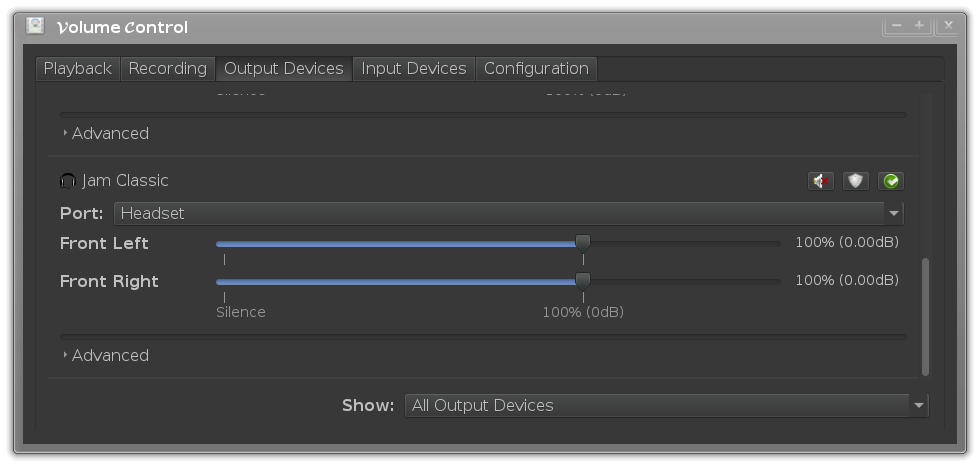
    however I still like pavucontrol (Pulse Audio volume control) better ,,,,,,,,,it gives you the options of redirecting the streams to different output devices and lets you change all the same hardware settings as in "system settings>multimedia"

    the output device "Jam classic" is a blue tooth speaker


    device configuration tab


    selecting where to send the audio stream from Dolphin


    VINNY

    Leave a comment:


  • sithlord48
    replied
    i finally installed pulseaudio on my laptop and can with kmix move streams to different devices , right click on the playback stream and if you devices are configured correctly you will be able to move the audio from one device to another

    Leave a comment:


  • Fester Bestertester
    replied
    OK, so I needed to look a little deeper... Kmix from the System Tray does not have separate sliders per output device, but click the Mixer button and there they are, complete with Mute/unmute 'speaker' icons. Now can we get ALL output streams/devices ENABLED by default and not 'push-button-selectable' as 'Default', cutting off all others? and then dispense with the 'brain-dead' present System Tray item (which with its push-button selection overrides the true Mixer) and replace it with this real Mixer? What purpose is served by this 'Default' promote/demote system anyway? What say?
    Last edited by Fester Bestertester; Aug 04, 2015, 05:07 PM.

    Leave a comment:


  • Fester Bestertester
    replied
    read back a little: Been there, done that. Setting any one of the choices (bluetooth Streamer is one) as default cuts off any other. Turns Kmix from 'mixer' to push-button 'selector'. Grrrrr! When there is a separate slider for any such (check-box selectable?) output device I will begin to consider Kmix as a Mixer.

    Leave a comment:


  • sithlord48
    replied
    after you have connected the device you need to set it as your default output in system settings ->multimedia. it should show up in the device prefrences list move it to the top of the lists you want it to be default for . otherwise with the pauvcontroll stuff you should be able to move streams to the "sink " (output device) of your choosing when they are connected. (its been a long time since i have used the controls directly so they maybe changed a bit )

    Leave a comment:


  • Fester Bestertester
    replied
    I think I saw that fly past during the above install, so that's likely already in there as part of something else.
    Checking... Yep - installed. Above query still in effect...

    Leave a comment:


  • vinnywright
    replied
    thats "pavucontrole"

    VINNY

    Leave a comment:


  • Fester Bestertester
    replied
    Hi!
    Installed
    paman paprefs (couldn't find pacontrol)

    Gave me more monitoring (vu's - nice!), but still nothing wants to recognise Bluetooth as an output device.

    Any further steps?

    Leave a comment:

Users Viewing This Topic

Collapse

There are 0 users viewing this topic.

Working...
X