Page 15 of 16 FirstFirst ... 513141516 LastLast
Results 141 to 150 of 160

Thread: Be Wily and Enjoy the Progress of Kubuntu 15.10

  1. Back To Top    #141
    Fat dude on a fixie claydoh's Avatar
    Join Date
    Sep 2005
    Location
    Somewhere NOT Down Under yet :(
    Posts
    6,468
    Threads
    209
    Local Date
    Jan 3rd 2018
    Local Time
    01:47 PM
    Homepage: Go to claydoh's homepage
    Note that "unsupported updates" is normally enabled in *bubntu. - this is the so-called "Universe" repo, that contains mainly packages automatically ported from Debian. They are safe as they really are not the sort of packages that mess with your system.

    Now, "pre-release updates" is the "-proposed" repo, ands is NOT normally enabled in *buntu. These are things that may need a bit of extra usage testing before moving out into the normal repos.

    the pre-release updates are probably where the problems arise, here in testing land. I don't really know why they use pre-release testing repo in a pre-release testing distro version, outside of very quickly checking out a fix to a major problem or something, but there are/were some kubuntu packages in there, specifically kontact/kdepim stuff at some point (I was checking them out ) I guess I can see having kmail stuff ported to Plasma 5 being kept out of the main OS, as we all know how well the pim stuff likes to go boom

  2. Back To Top    #142
    Kubuntu as Second Language NoWorries's Avatar
    Join Date
    Jun 2007
    Location
    Adelaide, South Australia
    Posts
    1,162
    Threads
    126
    Local Date
    Jan 4th 2018
    Local Time
    05:17 AM
    Thanks for the clarification and I now don't feel so bad about having the "Unsupported updates" selected. I am finding that the pre-release packages still do not like my auxiliary monitor as was the case when I did not have that option selected.

    I will see how my system goes when I do a re-install in a day or two as I will have to use this Laptop for both projection and video processing. I attend a "progressive" Christian Church and they have been very impressed with the projections that I do with LibreOffice. Now the MS person who does the video processing for services is away for a couple of months and I am the only person who has the ability to do the video processing. Wily came along just in time for me to be able to do the video processing as I had endless problems with previous versions.

  3. Back To Top    #143
    Kubuntu as Second Language NoWorries's Avatar
    Join Date
    Jun 2007
    Location
    Adelaide, South Australia
    Posts
    1,162
    Threads
    126
    Local Date
    Jan 4th 2018
    Local Time
    05:17 AM
    I have not been able to find an ISO since the 12th September that will boot. I keep getting ubiquity crashing, I finally decided to write down the first line of the error, which is
    Code:
    /var/lib/ubiquity/ubiquity/nm.py, line 225, in build-cache devices=self.manager.GetDevices()
    I hope I got it right.

    I tested the usb on two different systems and the same error was reported. I also used UNetbootin and that gave the same results. I found an ISO for the 8th September and that is currently being installed and configured, ie ubiguity is working on this one.

    Has anyone else had problems with the latest ISO's?

  4. Back To Top    #144
    Kubuntu as Second Language NoWorries's Avatar
    Join Date
    Jun 2007
    Location
    Adelaide, South Australia
    Posts
    1,162
    Threads
    126
    Local Date
    Jan 4th 2018
    Local Time
    05:17 AM
    I have now got my system working - sort off.

    I am still having trouble with kactivitymanagerd stopping the desktop from working. I have my system come up with KSysGuard as this is the only way I can get at kactivitymanagerd to Kill it. Plasmashell this takes several minutes to then settle down and let me have a desktop that is usable.

    I am wondering if there is any way to stop kactivitymanagerd from running in the first place as its presence places sever restrictions on using my Laptop.

  5. Back To Top    #145
    Kubuntu as Second Language NoWorries's Avatar
    Join Date
    Jun 2007
    Location
    Adelaide, South Australia
    Posts
    1,162
    Threads
    126
    Local Date
    Jan 4th 2018
    Local Time
    05:17 AM
    Quote Originally Posted by NoWorries View Post
    I am wondering if there is any way to stop kactivitymanagerd from running in the first place as its presence places sever restrictions on using my Laptop.
    Finally got it working. What I found was in my home directory I had files
    Code:
     ~/.config/kactivitymanagerd-pluginsrc
     ~/.config/kactivitymanagerdrc
     ~/.local/share/kactivitymanagerd
    I added _bk to the end of all these files and then rebooted. My system made new files for kactivitymanagerdrc and kactivitymanagerd
    Now it is working perfectly with NO SIGN of processing by kactivitymanagerd on htop - hallelujah!!

  6. Back To Top    #146
    Fat dude on a fixie claydoh's Avatar
    Join Date
    Sep 2005
    Location
    Somewhere NOT Down Under yet :(
    Posts
    6,468
    Threads
    209
    Local Date
    Jan 3rd 2018
    Local Time
    01:47 PM
    Homepage: Go to claydoh's homepage
    Yay!!!

  7. Back To Top    #147
    Kubuntu as Second Language NoWorries's Avatar
    Join Date
    Jun 2007
    Location
    Adelaide, South Australia
    Posts
    1,162
    Threads
    126
    Local Date
    Jan 4th 2018
    Local Time
    05:17 AM
    Quote Originally Posted by claydoh View Post
    Yay!!!
    Thanks very much. I decided to check the dates of the original files that I added "bk" to and they were:

    12th Sept 2015 for the ~/.config files and,
    9th September 2015 for the ~/.local file

    So they were not that long ago which makes me wonder which one caused the trouble why it or they were giving trouble.

  8. Back To Top    #148
    Senior Member
    Join Date
    May 2012
    Posts
    113
    Threads
    5
    Local Date
    Jan 3rd 2018
    Local Time
    01:47 PM
    Quote Originally Posted by NoWorries View Post
    I have not been able to find an ISO since the 12th September that will boot. I keep getting ubiquity crashing, I finally decided to write down the first line of the error, which is
    Code:
    /var/lib/ubiquity/ubiquity/nm.py, line 225, in build-cache devices=self.manager.GetDevices()
    I hope I got it right.

    I tested the usb on two different systems and the same error was reported. I also used UNetbootin and that gave the same results. I found an ISO for the 8th September and that is currently being installed and configured, ie ubiguity is working on this one.

    Has anyone else had problems with the latest ISO's?
    Yes. a thumb drive created with unetbootin failed with a syslinux error, and the same one created with dd crashed ubiquity.

    EDIT: The developers know about it: http://irclogs.ubuntu.com/2015/09/15...el.html#t13:46
    Last edited by mparillo; Sep 16th 2015 at 11:33 PM. Reason: The Devs know about it

  9. Back To Top    #149
    Kubuntu as Second Language NoWorries's Avatar
    Join Date
    Jun 2007
    Location
    Adelaide, South Australia
    Posts
    1,162
    Threads
    126
    Local Date
    Jan 4th 2018
    Local Time
    05:17 AM
    Quote Originally Posted by mparillo View Post
    EDIT: The developers know about it: http://irclogs.ubuntu.com/2015/09/15...el.html#t13:46
    I had difficulty finding the bug at this address. But is was reported 4 days ago at this address:

    https://bugs.launchpad.net/ubuntu/+s...y/+bug/1495194

    and has been confirmed. I will be interested to know when this is fixed as the Final Beta is due on the 24th September and I am sure there are many who want to test it. In the past I have found that Kubuntu Beta releases are very stable.

  10. Back To Top    #150
    Ancient vinnywright's Avatar
    Join Date
    Apr 2009
    Posts
    7,188
    Threads
    150
    Local Date
    Jan 3rd 2018
    Local Time
    06:47 PM

    QT-Cool

    So is anyone a fan of animated wallpapers ?

    if so you may have seen that the option for them is gone from "Desktop settings>wallpaper type" in 15.10

    However it seems that all the choices that are their ,,,,,,,are directory’s in
    Code:
            
    vinny@vinny-Bonobo-Extreme:~$ ls /usr/share/plasma/wallpapers 
    org.kde.color org.kde.haenau org.kde.hunyango org.kde.image org.kde.slideshow
    
    Now all these have the standard(well what seems to be from what I see hear) Qt stuff in them /contents/ui ,,,,, .qml's .xml's ,,,bla bla

    I got to thinking most the anamated.gif wallpapers I had seen where just that ,,,,,a .gif with a .qml

    So ,,,,,,,,,,,,I got to tinkering ,,,,,,,and ,,,,,,, I have one running on my 15.10 desktop

    hear it goes ,,,,,,,,,,,,,,,,,,,,,,,,,,,,,,,,,,,,,,,,,,,,,,,,,, ,,,,,,,,,,,,,,,
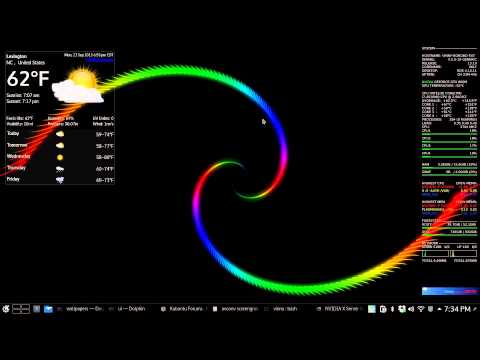
    DL http://kde-look.org/content/show.php?content=166584

    extract some where ,,,,,,,,,,,it contains
    Code:
             
           vinny@vinny-Bonobo-Extreme:~/Documents/build/qml wallpapers$ ls 
    cable firenew nature ocean sunset tornado waterfall
    fireflower matrix nature2 stardust swirl vista wave
    
    I chose to use the "swirl" ,,,you can look at the .gif's in each of the directory's /contents directory to see what’s what .

    open a root dolphin
    Code:
    kdesudo dolphin
    go split view and on one side open where you extracted the wallpapers ,,,,,,on the other ,,/usr/share/plasma/wallpapers

    drag and drop the one you like to
    /usr/share/plasma/wallpapers

    rename it "org.kde.<nameoftheoneyoulike>"

    inside it you will see
    Code:
     vinny@vinny-Bonobo-Extreme:~/usr/share/plasma/wallpapers/org.kde.swirl$ ls 
    contents  metadata.desktop


    you can leave the
    metadata.desktop alone ,,,,,,,,,,open /contents
    Code:
     vinny@vinny-Bonobo-Extreme:~/usr/share/plasma/wallpapers/org.kde.swirl/contents$ ls 
    main.qml  swirl.gif
    
    
    cut both of these ,,,,make a new directory /ui and paste them in hear

    Code:
     vinny@vinny-Bonobo-Extreme:/usr/share/plasma/wallpapers/org.kde.swirl/contents/ui$ ls 
    main.qml  swirl.gif


    open the "main.qml" from your root dolphin with kate

    Code:
    import QtQuick 1.1
    
    Rectangle {
         width: animation.width; height: animation.height
    
         AnimatedImage { id: animation; source: "swirl.gif" }
    
     }
    and change the QtQuick 1.1 to QtQuick 2.0

    save and exit ,,,,,,,,,,,,,,,,,,,,,,,,,,,,,,,,,,,,,,,,,,,,,,,,,, ,,,

    thats it you should have the name of the one you chose (in my case swirl) in desktop settings>wallpaper type

    Now on one or 2 tries desktop settings did not pickup my addition to /usr/share/plasma/wallpapers/ for some reason that I could not discern ,,,,,on a subsequent try it did on another did not ,,,,,Go figure .

    Obligatory screencast ,,,,,,,,,,,,,,,,,,,,,,,,,,,,,, ,,,,,,,,,,,,,,,,,,,,,,,,,,,,,,,,,,,,,,,,,


    ☢VINNY☢
    system76 Bonox8
    i7 4core HT 8MB L3 2.9GHz
    16GB RAM
    Nvidia GTX 860M 4GB RAM 1152 cuda cores

Page 15 of 16 FirstFirst ... 513141516 LastLast

Posting Permissions

  • You may not post new threads
  • You may not post replies
  • You may not post attachments
  • You may not edit your posts
  •