
Okay, I'm one step further now. Starting with
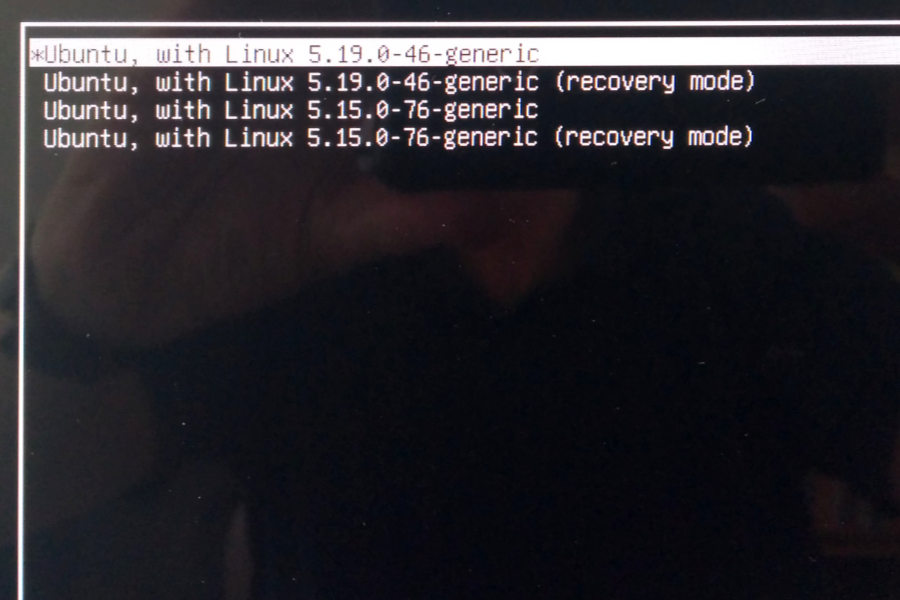
Advanced options / Linux with 5.19.0-46-generic > boot is working
Advanced options / Linux with 5.15.0-76-generic > boot is working
Ubuntu withou advance options > boot stops before KDE as described above
Though I'm anything but an advanced user, I can live with selecting one of the advanced options when booting. What is the difference to booting in unadvanced mode?
-
PS: Actually this can get a bit tricky on a Mac - I forgot…- switch on the iMac
- hold down [Alt] as soon as you hear the startup sound
- with the [Tab] key select "EFI Boot" and hit [Return]
- immediatly hold down [Esc] until you see something like:
grub>
grub>
grub>
grub>
grub>
grub>
grub> - type in: normal and hit [Return]
- immediatly hold down [Esc] - you should be in the GRUB boot menu now

PPS: I see you managed it. No EFI boot? Will read your answers now.
Leave a comment:
-
Schwarzer Kater Thanks, and no, there is no prompt, just a blinking cursor not reacting to anything. I don't know what a tty is, but nothing at all happens when I press Ctrl+Alt-F4.
I think the original line had 18.04 twice and I corrected just the first occurence – obviously it was not my brightest day ever. I promise to not doing it again, with no system. Anyway, as a first step I ranWhy would you try to install parts of the *Ubuntu 18.04 LTS hwe in Kubuntu 22.04 LTS?
sudo apt install --reinstall --install-recommends xserver-xorg
and rebooted. Sadly with no success.Last edited by ralfheinz; Jul 19, 2023, 01:45 AM.Leave a comment:
-
claydoh Thanks for your feedback, sadly I can't recapitulate where I found this installation proposal. Something with the right driver for audio components on Macs or whatever.
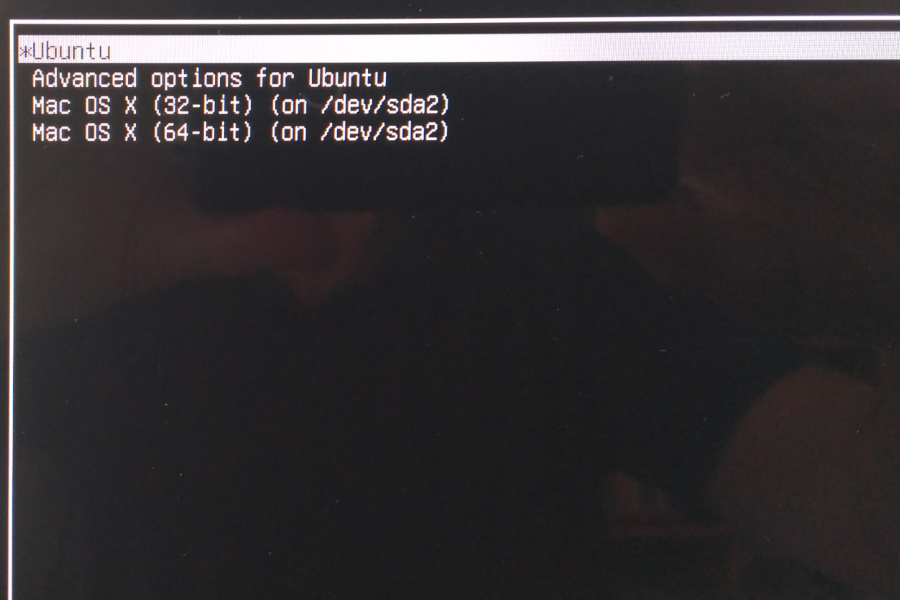
At least I can positively answer your other questions: Yes, the iMac has a Nvidia GeForce GTX 660M (sounds a bit like a race car or a men's razor) and here are photos of the grub menu:
Last edited by ralfheinz; Jul 19, 2023, 01:04 AM.Leave a comment:
-
Depending on the model the Apple iMac (late 2012) has an Nvidia GPU:
21,5" = Nvidia GeForce GT 640M or 650M
27" = Nvidia GeForce GTX 660M, 675MX, or 680MX
ralfheinz :
After starting the iMac (the MacBook Pro is OK?) - do you get a login prompt?
Can you get to a tty by pressing e.g. [Ctrl] [Alt] [F4] ?Last edited by Schwarzer Kater; Jul 18, 2023, 09:49 AM.Leave a comment:
-
Welcome.
apt-get install --install-recommends […] xserver-xorg-hwe-18.04 ?
Perhaps I am a bit "touchy" today, but why would you try to install parts of the *Ubuntu 18.04 LTS hwe in Kubuntu 22.04 LTS?
If you don't understand a command, please ask here - it is best to never just copy and paste something from the internet without understanding it… Not for Linux, not for Windows, not for any system.
Luckily it doesn't seem to do anything harmful to 22.04 ( claydoh said).
Did you reinstall xserver-xorg for 22.04 LTS afterwards?
If you are not sure if anything has been removed by accident, you could reinstall it with
sudo apt install --reinstall --install-recommends xserver-xorg . (--install-recommends might not be necessary here, but it seems to be saver in your situation)
Reboot afterwards.
And if you want to additionally use the 5.19 hwe kernel in Kubuntu 22.04 LTS (if you only have the 5.15 kernel, because e.g. you installed from the 22.04.0 or 22.04.1 ISO) :
sudo apt install --install-recommends linux-generic-hwe-22.04 (nothing more).
Reboot afterwards.
PS: Bluetooth and WiFi work better with the 5.19 kernel on my MacBook Pro.Leave a comment:
-
Can you say what this package was installed for, or where you found this? The first one is a meta-package that enables the more current kernels on 22.04 LTS, so a 5.19 alongside the original 5.15 kernels. Them you can select different ones from your grub boot menu.Originally posted by ralfheinz View Post
You actually should be able to select from different 5.15 kernels there as well.
If you installed Kubuntu 22.04 using the latest ISO image, you would already have this installed (it would not do anything),. You would not have any of the original 5.15 kernels, but still should have at least two kernels to boot from in your Grub menu. it could be worth trying out one of those.
If you can, please post an image of what you see at your Grub boot menu
The second one isn't actually doing anything, it is also a meta-package that simply depends on xserver-xorg (which you already have), and provides upgrade compatibility from older releases. It doesn't add any software.
Now, does your system use Nvidia graphics by any chance?
If you can, please post an image of what you see at your Grub boot menu.
Leave a comment:
-
[SOLVED] 22.04 Boot stops just before KDE starts
Hi there,
I'm still relatively new to Linux and Kubuntu, but could at least manage to install and run 22.04 on a MacBook Pro late 2013 and an iMac late 2012, both with dual boot. Both systems were running (nearly) flawless for a few months, but now the iMac doesn’t boot correctly anymore. Everything seems to be okay until just before KDE starts, the attached photo shows the last thing that happens before it's getting sticky:
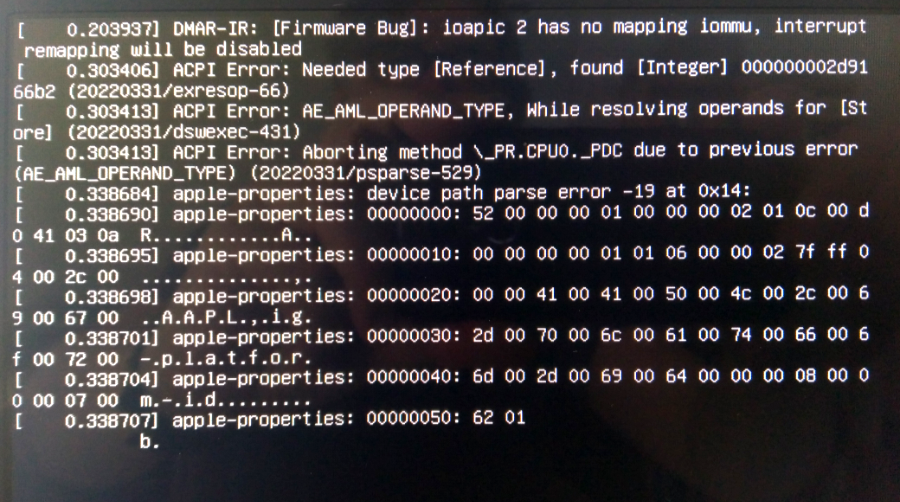
When I start booting in recovery mode and resume the boot normally by selecting the appropriate option from the dropdown, the boot seems to get finished, despite the warning that not all components might run fine this way.
The interesting question is, what have I done before the mysery began. Unfortunately I'm not quite sure, but as far as I remember everything was okay before I ran this:
apt-get install --install-recommends linux-generic-hwe-22.04 xserver-xorg-hwe-18.04
It was a trial to solve a minor problem with headphones not working, and I don't really understand what I've done with it, just copied and pasted it from somewhere. To get rid of the boot problem I tried to reset it with
apt remove --install-recommends linux-generic-hwe-22.04 xserver-xorg-hwe-18.04
but no success at all. I'm annoyed by my own stupidity and would have done better to ignore this headphone bagatelle like I did since months without any sleepless nights.
Maybe one of you more experienced guys can lead me at least to the right path to begin with. Thanks.
Leave a comment: