

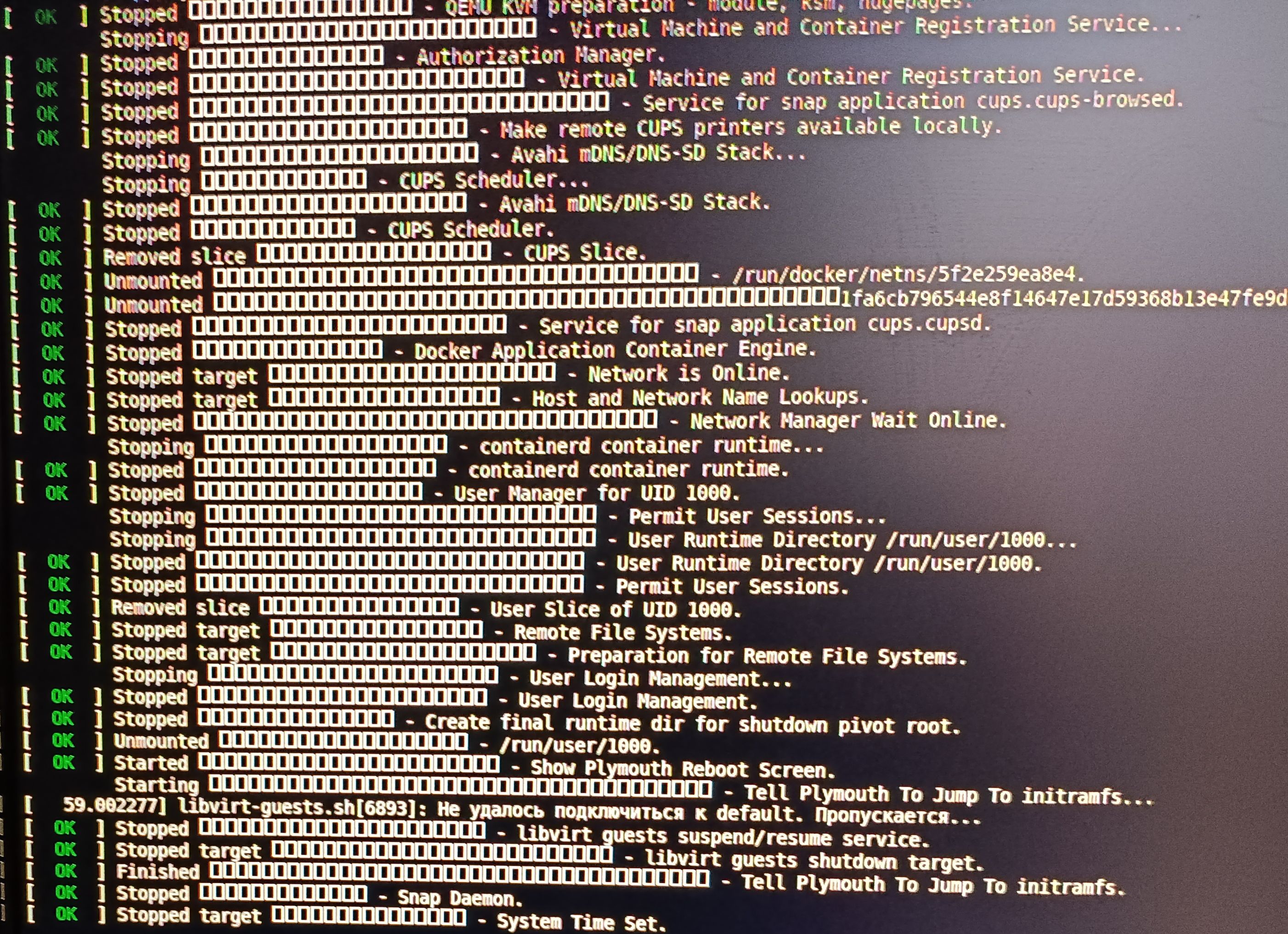
I just can’t figure out how to overcome the strange squares when completing the system. It's strange that these are not locale errors, because the description contains both English and Russian characters (I'm from Kazakhstan).
In principle, this does not interfere, but I am a perfectionist by nature and it bothers me if the system does not work quite correctly.
Operating System: Kubuntu 26.04 LTS
KDE Plasma Version: 6.6.4
KDE Frameworks Version: 6.24.0
Qt Version: 6.10.2
Kernel Version: 7.0.0-22-generic (64-bit)
Graphics Platform: Wayland
Processors: 32 × Intel® Xeon® CPU E5-2676 v4 @ 2.40GHz
Memory: 64 ГиБ of RAM (62.6 ГиБ usable)
Graphics Processor: NVIDIA GeForce RTX 2070
Manufacturer: Intel
Product Name: X99
Additional questions
1) why does /usr/lib/tmpfiles.d/debian.conf recreate /etc/vconsole.conf -> /etc/default/keyboard ?
These are files of different settings
2) sudo setupcon --save --force 2>&1 gives
setfont: ERROR kdfontop.c:212 put_font_kdfontop: Unable to load such font with such kernel version setfont: ERROR kdfontop.c:212 put_font_kdfontop: Unable to load such font with such kernel version setfont: ERROR kdfontop.c:212 put_font_kdfontop: Unable to load such font with such kernel version setfont: ERROR kdfontop.c:212 put_font_kdfontop: Unable to load such font with such kernel version setfont: ERROR kdfontop.c:212 put_font_kdfontop: Unable to load such font with such kernel version The keyboard is in an unknown mode Enabling the requested mode may make the keyboard inoperable, specify the -f parameter to force the change.
In principle, this does not interfere, but I am a perfectionist by nature and it bothers me if the system does not work quite correctly.
Operating System: Kubuntu 26.04 LTS
KDE Plasma Version: 6.6.4
KDE Frameworks Version: 6.24.0
Qt Version: 6.10.2
Kernel Version: 7.0.0-22-generic (64-bit)
Graphics Platform: Wayland
Processors: 32 × Intel® Xeon® CPU E5-2676 v4 @ 2.40GHz
Memory: 64 ГиБ of RAM (62.6 ГиБ usable)
Graphics Processor: NVIDIA GeForce RTX 2070
Manufacturer: Intel
Product Name: X99
Additional questions
1) why does /usr/lib/tmpfiles.d/debian.conf recreate /etc/vconsole.conf -> /etc/default/keyboard ?
These are files of different settings
2) sudo setupcon --save --force 2>&1 gives
setfont: ERROR kdfontop.c:212 put_font_kdfontop: Unable to load such font with such kernel version setfont: ERROR kdfontop.c:212 put_font_kdfontop: Unable to load such font with such kernel version setfont: ERROR kdfontop.c:212 put_font_kdfontop: Unable to load such font with such kernel version setfont: ERROR kdfontop.c:212 put_font_kdfontop: Unable to load such font with such kernel version setfont: ERROR kdfontop.c:212 put_font_kdfontop: Unable to load such font with such kernel version The keyboard is in an unknown mode Enabling the requested mode may make the keyboard inoperable, specify the -f parameter to force the change.


Comment