Well my computer was loading fine for a little over a week and now it's doing the same thing again. Here is my latest bootchart.....
http://www.pictureshack.us/images/29...20140204-1.png
I just don't understand why it's doing this. Any help appreciated.
-
Ok. I did the pictureshack and it gave many links. I copied this one....
http://www.pictureshack.us/view_8600...20140124-5.pngLeave a comment:
-
You're going to have to post higher resolution pic. There's no way to read that. Try uploading to http://www.pictureshack.us/Leave a comment:
-
Now I remember that by-partuuid is present only for GPT disks. You have an MBR disk.
Your resume file is correct.
Without more details, it's very difficult to diagnose a problem like this. Have you installed and examined a boot chart?Leave a comment:
-
ed@ed-dell:~$ ll /dev/disk
total 0
drwxr-xr-x 6 root root 120 Jan 23 16:15 ./
drwxr-xr-x 14 root root 4640 Jan 23 16:15 ../
drwxr-xr-x 2 root root 560 Jan 23 16:15 by-id/
drwxr-xr-x 2 root root 100 Jan 23 16:15 by-label/
drwxr-xr-x 2 root root 320 Jan 23 16:15 by-path/
drwxr-xr-x 2 root root 120 Jan 23 16:15 by-uuid/
yes i think /dev/sda5 is my swap. Thank you.Leave a comment:
-
Is /dev/sda5 your swap partition?
Also, I'm curious about that error message. Although it's unrelated to startup issues, you should have a /dev/disk/by-partuuid subdirectory. What's the output of
Code:ll /dev/disk
Leave a comment:
-
I don't think reinstalling kubuntu solves this problem. I'm having the exact same issue. Doing what steveriley suggests gives me this.....
Code:ed@ed-dell:~$ cat /etc/initramfs-tools/conf.d/resume RESUME=UUID=990631a9-ffa3-42f2-8acf-e0fa172e8ab0 ed@ed-dell:~$ ll /dev/disk/by-uuid total 0 drwxr-xr-x 2 root root 120 Jan 18 18:34 ./ drwxr-xr-x 6 root root 120 Jan 18 18:34 ../ lrwxrwxrwx 1 root root 10 Jan 18 18:34 43a999d6-7d03-4761-ac7a-6dafcb428031 -> ../../sda1 lrwxrwxrwx 1 root root 10 Jan 18 18:34 7EABE04647791398 -> ../../sdb1 lrwxrwxrwx 1 root root 10 Jan 18 18:34 990631a9-ffa3-42f2-8acf-e0fa172e8ab0 -> ../../sda5 lrwxrwxrwx 1 root root 10 Jan 18 18:34 B808269308265124 -> ../../sdg1 ed@ed-dell:~$ ll /dev/disk/by-partuuid ls: cannot access /dev/disk/by-partuuid: No such file or directory ed@ed-dell:~$
Are mine right? What else could fix this problem?Leave a comment:
-
Well, I think I fixed my issue. I just reinstalled Kubuntu 12.04. I decided to try KWheezy instead, but the liveCD wouldn't load on my computer for some reason. I took it as a bad sign and decided against it.
Hopefully, this install will be as stable as the one before my last.Leave a comment:
-
Well, I finally got the chance to reboot and here's the results:
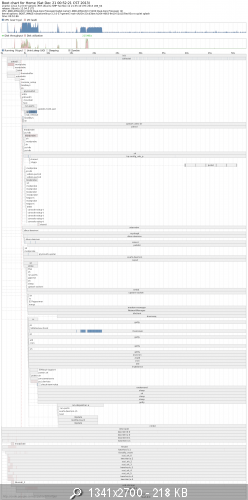
I can't quite make heads or tails out of it and the ubuntu page where you're supposed to compare them won't let me upload it for some odd reason.
Anyways, I rebooted again, but this time I logged in and ran startx. I got majorly different results:
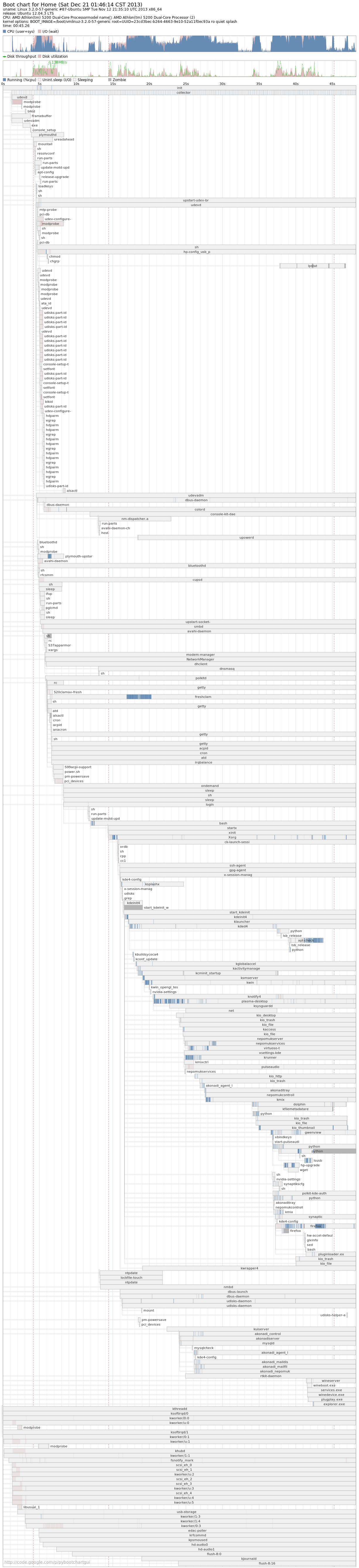 Last edited by charles052; Dec 21, 2013, 01:54 AM.
Leave a comment:
-
The outputs match, so that's good.
Read about and install bootchart -- perhaps this can give some insight into where the delay is.Leave a comment:
-
Code:home@Home:~$ cat /etc/initramfs-tools/conf.d/resume RESUME=UUID=bccfee89-3b67-4d6c-9bd8-26d6f81f68c1 home@Home:~$ ll /dev/disk/by-uuid total 0 drwxr-xr-x 2 root root 100 Dec 18 16:30 ./ drwxr-xr-x 6 root root 120 Dec 18 16:30 ../ lrwxrwxrwx 1 root root 10 Dec 18 16:30 23cd3bec-b264-4663-9e10-52a11f0ec93a -> ../../sda1 lrwxrwxrwx 1 root root 10 Dec 18 16:30 28203688-2775-49a2-8d0b-4bc9288fb3a1 -> ../../sdb3 lrwxrwxrwx 1 root root 10 Dec 18 16:30 bccfee89-3b67-4d6c-9bd8-26d6f81f68c1 -> ../../sda5 home@Home:~$ home@Home:~$ ll /dev/disk/by-partuuid ls: cannot access /dev/disk/by-partuuid: No such file or directory
KDM is already installed. I've tried some settings and compared it to my other computers, but it's a no go. Then I tried to purge kdm and then reinstall it when I booted to the terminal, but that didn't do the trick either.Leave a comment:
-
Something is delaying the start of LightDM, the display manager that controls your X session.Originally posted by charles052 View Post
I've seen this happen on rare occasion when the hibernation resume file points to a non-existent partition. What's the output of
Also, you could try switching from LightDM to KDM, KDE's default display manager. I prefer it over LightDM, actually. To do this:Code:cat /etc/initramfs-tools/conf.d/resume ll /dev/disk/by-uuid ll /dev/disk/by-partuuid
During installation, a menu will appear, asking which display manager you wish to use. Select KDM. Allow the installation to finish, then reboot. Does KDM start more quickly than LightDM now?Code:sudo apt-get install kdm
Leave a comment:
-
Well, this has been going on for a couple months. I'm not sure if it will work itself out.Originally posted by Buddlespit View PostLeave a comment:
-
Mine did that for a couple of boots. I allowed it to do what it was doing, and it eventually stopped. I'm assuming it was setting itself up, precaching, preloading, aligning, ect al...Leave a comment:


Leave a comment: