

Edit: Reinstalling from the Beta iso got rid of whatever ailed my system. File dialogs are working fine. Counting a reinstall as Solved since this is beta.
Bringing this into the shiny new forum from another thread.
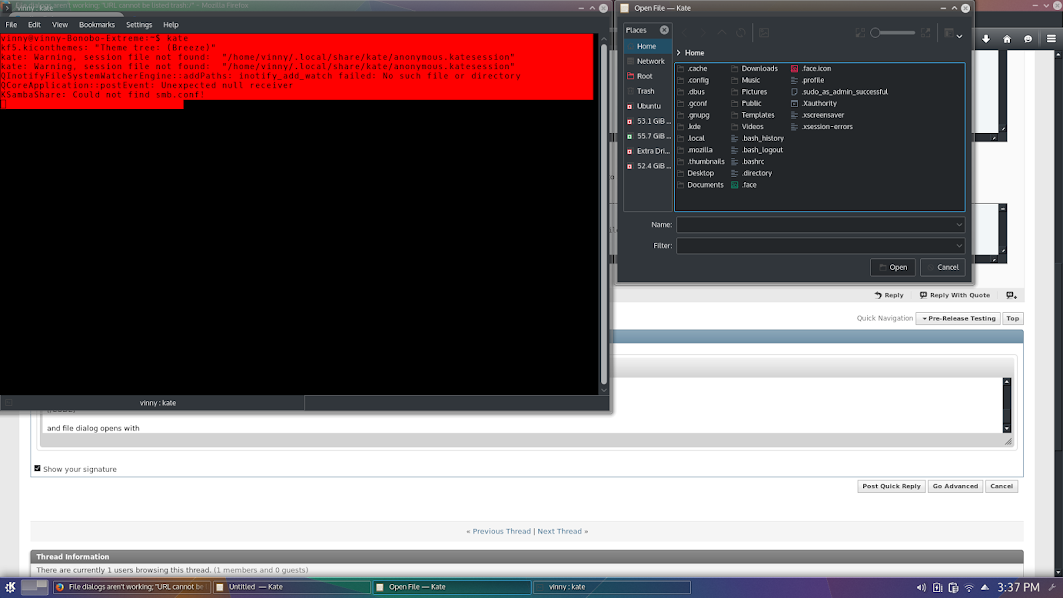
File Open/Save dialogs aren't working for me. Where I should see files is just blank. Easier to show than explain:
Breeze Dark: https://www.youtube.com/watch?v=MMscjFLo9LU
Breeze: https://www.youtube.com/watch?v=4AdgwJfUlko
I tried both themes at claydoh's suggestion. I also logged in under a plain vanilla user account with no customizations. Same problem.
I start kate from konsole, click on File, Open and get this:
Start usb-creator-kde from konsole, click the Other button to pick an iso, and:
I put a couple of files in the trash and they show up as expected. Dolphin works fine (what a great file manager).
Searching for "URL cannot be listed trash:/" and "Unable to create io-slave: klauncher said: Unknown protocol 'file'" hasn't lead to any solutions. One of the suggestions was to rebuild sycoca, so:
Bringing this into the shiny new forum from another thread.
File Open/Save dialogs aren't working for me. Where I should see files is just blank. Easier to show than explain:
Breeze Dark: https://www.youtube.com/watch?v=MMscjFLo9LU
Breeze: https://www.youtube.com/watch?v=4AdgwJfUlko
I tried both themes at claydoh's suggestion. I also logged in under a plain vanilla user account with no customizations. Same problem.
I start kate from konsole, click on File, Open and get this:
Code:
~ $ kate
kf5.kiconthemes: "Theme tree: (Breeze Dark)"
"URL cannot be listed
trash:/"
"URL cannot be listed
trash:/"
couldn't create slave: "Unable to create io-slave:
klauncher said: Unknown protocol 'file'.
"
QCoreApplication::postEvent: Unexpected null receiver
QCoreApplication::postEvent: Unexpected null receiver
QCoreApplication::postEvent: Unexpected null receiver
QCoreApplication::postEvent: Unexpected null receiver
QCoreApplication::postEvent: Unexpected null receiver
QCoreApplication::postEvent: Unexpected null receiver
QCoreApplication::postEvent: Unexpected null receiver
QCoreApplication::postEvent: Unexpected null receiver
Code:
~ $ usb-creator-kde
kf5.kiconthemes: "Theme tree: (Breeze Dark)"
"URL cannot be listed
trash:/"
"URL cannot be listed
trash:/"
couldn't create slave: "Unable to create io-slave:
klauncher said: Unknown protocol 'file'.
"
QCoreApplication::postEvent: Unexpected null receiver
kf5.kservice.sycoca: Trying to open ksycoca from "/home/ronw/.cache/ksycoca5"
QCoreApplication::postEvent: Unexpected null receiver
QCoreApplication::postEvent: Unexpected null receiver
QCoreApplication::postEvent: Unexpected null receiver
QCoreApplication::postEvent: Unexpected null receiver
Searching for "URL cannot be listed trash:/" and "Unable to create io-slave: klauncher said: Unknown protocol 'file'" hasn't lead to any solutions. One of the suggestions was to rebuild sycoca, so:
Code:
~ $ kbuildsycoca5 --noincremental
kbuildsycoca5 running...
Recreating ksycoca file ("/home/ronw/.cache/ksycoca5", version 300)
The menu spec file contains a Layout or DefaultLayout tag without the mandatory Merge tag inside. Please fix your file.
Saving
Emitting notifyDatabaseChanged ("services", "servicetypes", "xdgdata-mime", "apps")




Comment